
A cracked iPhone screen can turn every tap and swipe into a worry, but there are practical ways to get back to a crystal-clear display. Whether you prefer an Apple authorised service provider, a trusted repair shop, or a careful DIY approach, knowing your options helps minimize repair costs and downtime. In this guide, we explain the best ways to repair a cracked iPhone screen, compare service and repair choices, and outline what to expect from warranty coverage and Apple Support.
Understanding iPhone Screen Damage
When the iPhone screen is cracked, the issue can range from a hairline crack to deep shatters that affect the LCD or OLED layer. iPhones like iPhone 12, iPhone 13, iPhone 15, and even iPhone X use laminated displays where the glass, touch sensor, and display are fused, influencing repair or replacement complexity. Recognizing whether you need screen repair or full screen replacement guides your choice of service, cost, and turnaround.
Types of Cracked iPhone Screens
There are several types of cracked screen scenarios. A surface crack may leave touch responsive and display intact, allowing a straightforward phone screen glass repair without needing to replace the screen. Spiderweb shatters usually require complete screen replacement. Edge-to-edge fractures near the home button area on older iPhones can affect inputs. In severe cases, a defective display shows lines, dead zones, or black spots. Identify the damage type to decide between DIY and professional repair with genuine parts.
Common Causes of Screen Cracks
The most common causes include accidental damage from drops, pocket pressure, and impacts on corners. A cracked iPhone screen can also result from thermal stress, prior battery replacement mishandling, or low-quality replacement parts used by a non-authorised service center. Using thin cases or skipping screen protectors increases risk. Sometimes, a problem with your iPhone, such as a slightly lifted battery, can stress the phone screen. Understanding causes helps prevent repeat damage after repair.
Impact of a Cracked Screen on Functionality
When your screen is cracked, functionality can degrade quickly. Touch accuracy may become erratic, gestures misfire, and brightness can fluctuate if the LCD or OLED is damaged. Cracks can let moisture in, turning a minor issue into a defective display or broader iPhone repair. Face or proximity sensors might fail, and on models with a home button, Touch ID can be affected. Delaying repair risks further damage, higher costs, and warranty complications.
Best Ways to Repair a Cracked iPhone Screen
When your iPhone screen is cracked, the best ways to proceed depend on the extent of the crack, your budget, and whether the iPhone is still under warranty. Light damage might be handled with DIY screen repair, while deeper fractures that affect the LCD or OLED demand full screen replacement. Choose between Apple-authorised service, reputable independent shops, or mail-in service based on cost, downtime, and parts quality.
DIY Screen Repair Options
DIY screen repair can be a viable route if the crack is minor and you have tools and patience. For older iPhones with a home button, glass-only fixes are sometimes feasible, but many models, including iPhone 12, iPhone 13, iPhone 15, and iPhone X, require bonded assemblies, making full screen replacement safer. Consider guides, antistatic practices, and quality replacement parts. Opening your iPhone carries risk and may affect warranty or consumer law outcomes.
Using Repair Kits from iFixit
Repair kits from iFixit provide model-specific tools, step-by-step instructions, and curated replacement parts to repair a cracked iPhone screen. These kits typically include the display assembly for LCD or OLED models, adhesives, and screwdrivers tailored to iPhones. Following a detailed guide reduces the chance of damaging connectors or sensors. Weigh cost savings against calibration needs, waterproofing trade-offs, and warranty considerations.
When to Consider Professional Repair Services
Choose professional repair if touch fails, you see lines/black spots, or Face ID/Touch ID may be affected. An Apple authorised service provider or reputable iPhone repair shop can diagnose issues, ensure genuine parts, and restore waterproof seals during your replacement service. Professional repair is also wise after battery mishaps or when accidental damage coexists with other defects. Consider turnaround time, Apple Support, consumer law rights, and total repair value.
| When to choose professional repair | Why it matters |
|---|---|
| Touch fails; lines or black spots on screen; Face ID/Touch ID may be affected | Diagnosis by authorised or reputable shops, genuine parts, and restored waterproof seals |
| After battery mishaps or when accidental damage coexists with other defects | Professional service can address multiple issues safely and comprehensively |
| Considerations before repair | Turnaround time, Apple Support, consumer law rights, and total repair value |
iPhone Screen Replacement: What You Need to Know
If your cracked iPhone screen compromises display or touch, screen replacement is the safest path. Modern iPhones often require swapping the entire display assembly, especially on iPhone 12, iPhone 13, iPhone 15, and iPhone X with laminated OLED or LCD stacks. Verify use of genuine Apple parts and understand how warranty and Apple Support treat accidental damage in your repair completed process.
Steps Involved in Screen Replacement
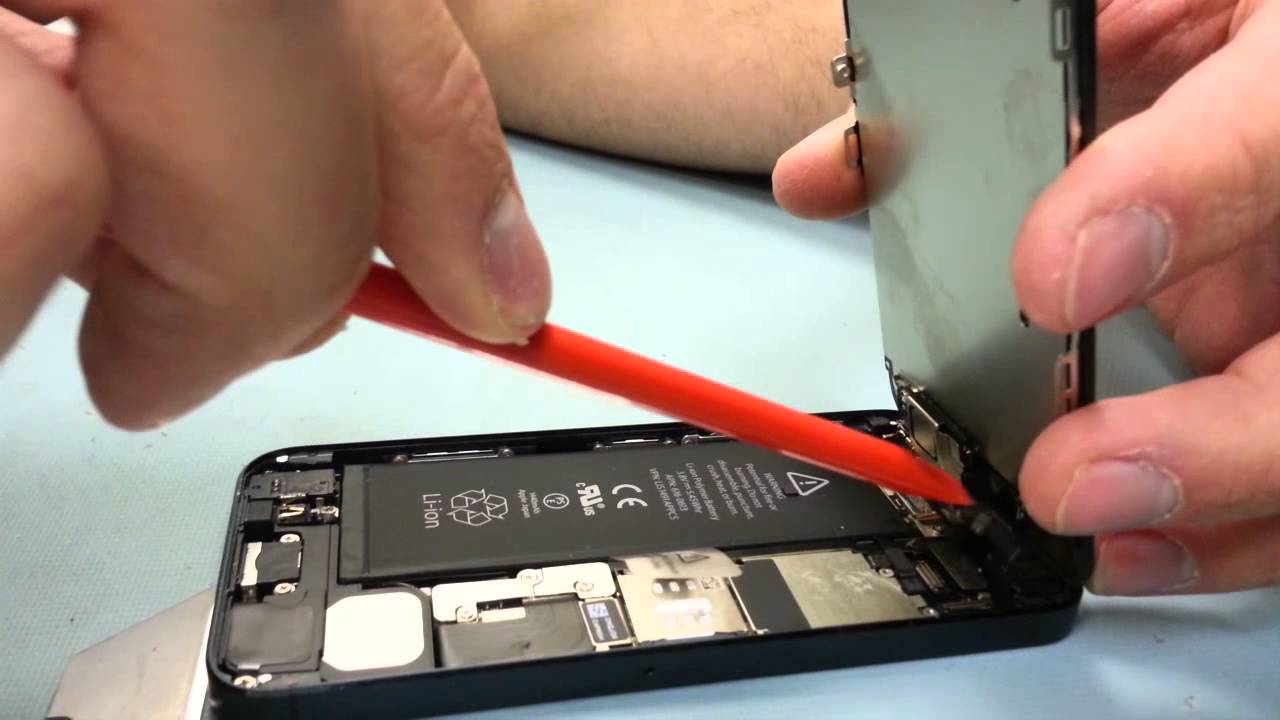
Screen replacement begins with powering down the smartphone and removing pentalobe screws near the phone screen for a proper repair completed. Technicians then soften adhesive, disconnect the battery, and lift the display to detach flex cables for LCD or OLED, sensors, and the home button or Face ID hardware.
| Step | Action |
|---|---|
| Installation | The new assembly with compatible replacement parts is installed, and waterproof seals are renewed during the phone repair process. |
| Verification | Function tests verify touch, brightness, and cameras. |
Final calibration ensures the repair meets specs and preserves functionality.
Choosing the Right Repair Shop
Prioritize shops using genuine or high-quality parts, clear pricing, and a written warranty. An Apple authorised service provider or Apple service center ensures full compatibility and access to Apple diagnostics. Independent iPhone repair shops can offer competitive pricing and fast turnaround, but verify technician credentials and part sourcing. Read reviews, confirm accidental-damage policies, and ask about data safety, waterproof integrity, and returns.
Cost to Fix a Cracked iPhone Screen
Repair costs vary by model, damage severity, and provider. Apple-authorised repairs using genuine parts are typically higher but include warranty-backed quality, while independents may offer lower pricing. Out-of-warranty accidental damage costs more than covered defects; consumer law may add protections in some regions. DIY with iFixit kits can cut expenses, but errors risk additional parts like a battery or sensors. Balance price with reliability, turnaround, and long-term device value.
Warranty and Repair Services
Navigating warranty and repair services for an iPhone screen can determine whether screen repair or full replacement is best, especially if you send you a replacement. If your screen is cracked, first check warranty status and whether accidental damage applies. Apple Support can confirm coverage, replacement options, and estimated costs. Understanding how authorised networks, service center policies, and consumer law interact helps you choose a local independent repair provider that uses genuine parts and delivers reliable outcomes.
AppleCare and Apple Warranty Coverage
Apple’s limited warranty doesn’t cover accidental damage; AppleCare+ reduces screen-repair costs via a per-incident fee in the phone repair process. If covered, visiting an Apple authorised service provider or service center ensures genuine parts and calibrated diagnostics. Apple Support can verify coverage, arrange mail-in service, and advise on consumer law protections beyond standard policies.
Understanding Repair Costs Under Warranty
Under standard warranty, a defective LCD or OLED panel from manufacturing issues may qualify for no-cost repair, but a drop-caused crack is billed as accidental damage and typically requires you to send you a replacement. With AppleCare+, iPhone screen repair has a reduced fee versus out-of-warranty prices. Without AppleCare+, costs vary by model, with iPhone 12, iPhone 13, iPhone 15, and iPhone X assemblies priced higher. Request itemized quotes for labor, parts, calibration, and waterproofing for your replacement service.
Finding Authorized Apple Repair Service
Use Apple’s official locator to find an authorised service provider or Apple service center. These options ensure genuine parts, proper sealing, and warranty-safe procedures for replacement service. If none are nearby, consider Apple’s mail-in service via Apple Support. Independent shops can be viable for speed, but verify training, parts, and accidental-damage policies. Always back up your device before service.
Conclusion: Maintaining Your iPhone Screen
After you repair a cracked iPhone screen, preserving the new screen is essential to avoid another crack and added costs. Combine quality accessories with thoughtful habits, and choose trusted partners for future issues. Prioritize genuine parts, careful handling around sensors/home button, and timely Apple Support when needed. Smart maintenance extends device life and reduces the need for replacement.
Preventive Measures to Avoid Future Cracks
Use a tempered-glass screen protector and a shock-absorbing case. Avoid pocket carry with keys, minimize edge impacts, and keep a firm grip when the screen is slick. Consider wrist straps for active use and avoid extreme temperatures. If you’ve cracked your iPhone before, review grip habits and bag storage. Regularly inspect for lifting around the display that might indicate battery swelling or other defects needing prompt repair.
| Action | Purpose |
|---|---|
| Use tempered-glass protector and shock-absorbing case | Reduce screen damage from drops and scratches |
| Avoid pocket carry with keys; minimize edge impacts | Prevent abrasions and high-stress impact points |
| Keep a firm grip; consider wrist straps for active use to prevent the need for phone repair. | Lower drop risk during daily and active movement |
| Avoid extreme temperatures; inspect for display lifting | Protect components and detect battery swelling or defects early |
| Review grip habits and bag storage if you’ve cracked your iPhone before | Address past causes and improve handling |
Best Practices for Screen Care
Keep the iPhone clean with microfiber cloths to prevent debris abrasion. Don’t press hard on the display, especially near edges or the home button on older iPhones. If the screen is cracked, avoid further use until a professional assesses it to prevent moisture damage. Charge with care to prevent cable stress on the port and display assembly. Schedule checkups if touch anomalies or brightness issues appear, signaling LCD or OLED concerns.
Final Thoughts on iPhone Screen Repair
Match your repair choice to coverage, cost, and part quality. Apple-authorised repair with genuine parts ensures consistency, while reputable shops and iFixit-guided DIY can reduce downtime or expense. Align choices with warranty, AppleCare+, and consumer law rights to address accidental damage or defects in phone repair services. With proactive care and trusted providers, you can repair a cracked iPhone screen efficiently and keep your smartphone performing like new, avoiding the need for a new iPhone.